
CoreBluetooth For Central (7)
Interact Data
從前面一系列的文章下來後對於掃描、停止掃描、連線、斷線、服務、屬性的使用都很清楚的了解,最後這篇文章要進入如何利用屬性與BLE週邊溝通獲取資料,藍牙 BLE CoreBluetooth 初探 中有張示意圖用來參考接下來要做的事情:
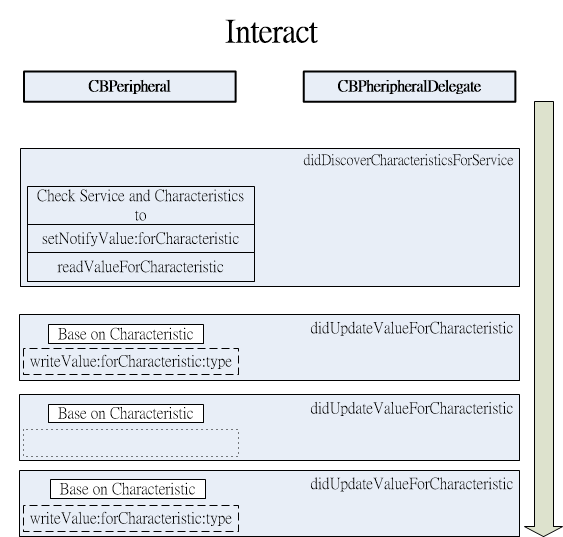
當我們尋訪完屬性之後,會得到屬性的UUID,從這邊我們要來利用CoreBluetooth讀取屬性設定以及設定屬性通知讓有資料更新時,CoreBluetooth Framework才會獲取UUID上的資料並通知對應的Delegate protocol使它即時得到資料,範例中需要即時更新的資料就是心跳測量的結果。
設定資料更新通知、讀取設定
這邊要將CoreBluetooth For Central (6)提到的peripheral:didDiscoverCharacteristicsForService進行修改,並增加檢查UUID來做對應的動作:
            //  CBService *s = [peripheral.services objectAtIndex:(peripheral.services.count - 1)];
            if(service.UUID == NULL || s.UUID == NULL) return; // zach ios6 added

            if ([c.UUID isEqual:[CBUUID UUIDWithString:HEART_RATE_MEASUREMENT_CHARACTERISTIC_UUID]]) { // 2
                [peripheral setNotifyValue:YES forCharacteristic:c];//設定2A37為通知型,值有變化時會引發Delegate
                NSLog(@"找到 心跳測量屬性");
            }else if ([c.UUID isEqual:[CBUUID UUIDWithString:HEART_RATE_BODY_LOCATION_CHARACTERISTIC_UUID]]) { // 3
                //讀取Heart Rate Measurement 位置
                [peripheral readValueForCharacteristic:c];
                NSLog(@"找到 心跳測量位置屬性 ");
            }
CoreBluetooth For Central (6)了解到2A37及2A38,所以進行處理:
- 2A37
這為即時通知型的資料更新,所以進行setNotifyValue:forCharacteristic的設定,如此有資料更新時會呼叫peripheral didUpdateValueForCharacteristic: error:
- 2A38
讀取Polar H7感測器所在位置,讀取後也是同樣會引發peripheral didUpdateValueForCharacteristic: error:,之後要針對這個呼叫進行屬性UUID的判斷
完整修改完的程式:
-(void)peripheral:(CBPeripheral *)peripheral didDiscoverCharacteristicsForService:(CBService *)service error:(NSError *)error
{

    CBService *s = [peripheral.services objectAtIndex:(peripheral.services.count - 1)];
    //NSLog(@"=========== Service UUID %s ===========\n",[NSUUID UUID] ini);
    if (!error) {
        NSLog(@"=========== %ld Characteristics of %@ service ",(long)service.characteristics.count,service.UUID);

        for(CBCharacteristic *c in service.characteristics){

            NSLog(@" %@ \n",c.UUID);
            //  CBService *s = [peripheral.services objectAtIndex:(peripheral.services.count - 1)];
            if(service.UUID == NULL || s.UUID == NULL) return; // zach ios6 added

            if ([c.UUID isEqual:[CBUUID UUIDWithString:HEART_RATE_MEASUREMENT_CHARACTERISTIC_UUID]]) {
                [peripheral setNotifyValue:YES forCharacteristic:c];//設定2A37為通知型,值有變化時會引發Delegate
                NSLog(@"找到 心跳測量屬性");
            }else if ([c.UUID isEqual:[CBUUID UUIDWithString:HEART_RATE_BODY_LOCATION_CHARACTERISTIC_UUID]]) {
                //讀取Heart Rate Measurement 位置
                [peripheral readValueForCharacteristic:c];
                NSLog(@"找到 心跳測量位置屬性 ");
            }
        }
        NSLog(@"=== Finished set notification ===\n");

    }
    else {
        NSLog(@"Characteristic discorvery unsuccessfull !\n");

    }


}
資料更新通知處理
所有被設定為資料更新通知或是直接讀取屬性資料的都會被引發呼叫,因此要針對屬性UUID進行判斷是哪個屬性的資料更新,這裡只對心跳測量資料更新、心跳表感測器位置資料進行處理,程式內容如下:
//更新通知Delegate,有進行setNotifyValue:forCharacteristic設定的UUID一旦有更新都會呼叫此protocol
- (void)peripheral:(CBPeripheral *)peripheral didUpdateValueForCharacteristic:(CBCharacteristic *)characteristic error:(NSError *)error
{
    // Updated value for heart rate measurement received
    if ([characteristic.UUID isEqual:[CBUUID UUIDWithString:HEART_RATE_MEASUREMENT_CHARACTERISTIC_UUID]]) { // 1
        //如果更新符合HEART RATE MEASUREMENT UUID進行心跳值的轉換
        [self conveterBPMData:characteristic error:error];
    //如果更新符合BODY SENSOR LOCATION UUID進行心跳值的轉換
    } else if ([characteristic.UUID isEqual:[CBUUID UUIDWithString:HEART_RATE_BODY_LOCATION_CHARACTERISTIC_UUID]]) {
        [self conveterLocation:characteristic];
    }
}
根據Bluetooth的Heart Rate Measurement規範中,必需要將取得的資料進行處理才能獲取正確的心跳測量值:
- (void) conveterBPMData:(CBCharacteristic *)characteristic error:(NSError *)error
{
    // Get the Heart Rate Monitor BPM
    NSData *data = [characteristic value];      // 1
    const uint8_t *reportData = [data bytes];
    uint16_t bpm = 0;
    //判定第0個byte之第0個bit值為1的話要將取得的byte反轉 (LSB->MSB)
    if ((reportData[0] & 0x01) == 0) {          // 2
        // Retrieve the BPM value for the Heart Rate Monitor
        bpm = reportData[1];
    }
    else {
        bpm = CFSwapInt16LittleToHost(*(uint16_t *)(&reportData[1]));  // 3
    }
    // Display the heart rate value to the UI if no error occurred
    if( (characteristic.value)  || !error ) {   // 4
        NSLog(@"%@",[NSString stringWithFormat:@"%i bpm", bpm]);
    }
    return;
}
同理,心跳表位感測器置資訊Body Sensor Location也是:
- (void) conveterLocation:(CBCharacteristic *)characteristic
{
    NSData *sensorData = [characteristic value];//取得資料
    uint8_t *locationData = (uint8_t *)[sensorData bytes];//轉換成byte來取得特定的byte
    if (locationData ) {
        uint8_t sensorLocation = locationData[0];
        /*
         0 Other
         1 Chest 胸部
         2 Wrist
         3 Finger
         4 Hand
         5 Ear Lobe
         6 Foot
         7 ~ 255 Reserved for future use
         因Porla H7為胸部位置,所以針對取值後判斷是不是為1
         */
        NSLog(@"%@",[NSString stringWithFormat:@"位置: %@", sensorLocation == 1 ? @"胸部" : @"非位於胸部"]); // 3
    }
    else {
        NSLog(@"%@",[NSString stringWithFormat:@"位置: 未知"]);
    }
    return;
}
如此,承之前的BluetoothLE-Explore範例程式進行修改後,您按下Scan and Connect後就會看到心跳測量的值:
2015-01-27 14:42:15.272 BluetoothLE-Interact[8644:7087526] UpdateState:PoweredOn
2015-01-27 14:42:18.872 BluetoothLE-Interact[8644:7087526] Scan And Connect
2015-01-27 14:42:19.212 BluetoothLE-Interact[8644:7087526] peripheral
<CBPeripheral: 0x165a7ed0, identifier = 8DC3DD90-0C17-1AB9-90FE-E9130DD07B81, name = Polar H7 000607, state = disconnected>
2015-01-27 14:42:19.213 BluetoothLE-Interact[8644:7087526] advertisementData
{
    kCBAdvDataIsConnectable = 1;
    kCBAdvDataLocalName = "Polar H7 000607";
    kCBAdvDataManufacturerData = <6b000303 58>;
    kCBAdvDataServiceUUIDs =     (
        "Heart Rate"
    );
    kCBAdvDataTxPowerLevel = 0;
}
2015-01-27 14:42:19.214 BluetoothLE-Interact[8644:7087526] RSSI
-55
2015-01-27 14:42:19.214 BluetoothLE-Interact[8644:7087526] localName:Polar H7 000607
2015-01-27 14:42:19.215 BluetoothLE-Interact[8644:7087526] stopScan
2015-01-27 14:42:19.215 BluetoothLE-Interact[8644:7087526] connect to Polar H7 000607
2015-01-27 14:42:21.233 BluetoothLE-Interact[8644:7087526] connected
2015-01-27 14:42:21.233 BluetoothLE-Interact[8644:7087526] Connect To Peripheral with name: Polar H7 000607
with UUID:8DC3DD90-0C17-1AB9-90FE-E9130DD07B81
2015-01-27 14:42:21.617 BluetoothLE-Interact[8644:7087526] didDiscoverServices:
2015-01-27 14:42:21.619 BluetoothLE-Interact[8644:7087526] ====Polar H7 000607
2015-01-27 14:42:21.619 BluetoothLE-Interact[8644:7087526] =========== 4 of service for UUID 8DC3DD90-0C17-1AB9-90FE-E9130DD07B81 ===========
2015-01-27 14:42:21.620 BluetoothLE-Interact[8644:7087526] Service found with UUID: Heart Rate
2015-01-27 14:42:21.620 BluetoothLE-Interact[8644:7087526] Service found with UUID: Device Information
2015-01-27 14:42:21.621 BluetoothLE-Interact[8644:7087526] Service found with UUID: Battery
2015-01-27 14:42:21.621 BluetoothLE-Interact[8644:7087526] Service found with UUID: 6217FF49-AC7B-547E-EECF-016A06970BA9
2015-01-27 14:42:21.738 BluetoothLE-Interact[8644:7087526] =========== 2 Characteristics of Heart Rate service
2015-01-27 14:42:21.738 BluetoothLE-Interact[8644:7087526]  2A37
2015-01-27 14:42:21.739 BluetoothLE-Interact[8644:7087526] 找到 心跳測量屬性
2015-01-27 14:42:21.740 BluetoothLE-Interact[8644:7087526]  2A38
2015-01-27 14:42:21.740 BluetoothLE-Interact[8644:7087526] 找到 心跳測量位置屬性
2015-01-27 14:42:21.741 BluetoothLE-Interact[8644:7087526] === Finished set notification ===
2015-01-27 14:42:22.008 BluetoothLE-Interact[8644:7087526] =========== 7 Characteristics of Device Information service
2015-01-27 14:42:22.009 BluetoothLE-Interact[8644:7087526]  System ID
2015-01-27 14:42:22.009 BluetoothLE-Interact[8644:7087526]  Model Number String
2015-01-27 14:42:22.010 BluetoothLE-Interact[8644:7087526]  Serial Number String
2015-01-27 14:42:22.010 BluetoothLE-Interact[8644:7087526]  Firmware Revision String
2015-01-27 14:42:22.011 BluetoothLE-Interact[8644:7087526]  Hardware Revision String
2015-01-27 14:42:22.011 BluetoothLE-Interact[8644:7087526]  Software Revision String
2015-01-27 14:42:22.012 BluetoothLE-Interact[8644:7087526]  Manufacturer Name String
2015-01-27 14:42:22.012 BluetoothLE-Interact[8644:7087526] === Finished set notification ===
2015-01-27 14:42:22.157 BluetoothLE-Interact[8644:7087526] =========== 1 Characteristics of Battery service
2015-01-27 14:42:22.158 BluetoothLE-Interact[8644:7087526]  Battery Level
2015-01-27 14:42:22.159 BluetoothLE-Interact[8644:7087526] === Finished set notification ===
2015-01-27 14:42:22.277 BluetoothLE-Interact[8644:7087526] =========== 1 Characteristics of 6217FF49-AC7B-547E-EECF-016A06970BA9 service
2015-01-27 14:42:22.277 BluetoothLE-Interact[8644:7087526]  6217FF4A-B07D-5DEB-261E-2586752D942E
2015-01-27 14:42:22.278 BluetoothLE-Interact[8644:7087526] === Finished set notification ===
2015-01-27 14:42:22.396 BluetoothLE-Interact[8644:7087526] 97 bpm
2015-01-27 14:42:22.517 BluetoothLE-Interact[8644:7087526] 位置: 胸部
2015-01-27 14:42:23.386 BluetoothLE-Interact[8644:7087526] 92 bpm
2015-01-27 14:42:24.406 BluetoothLE-Interact[8644:7087526] 91 bpm
2015-01-27 14:42:25.426 BluetoothLE-Interact[8644:7087526] 93 bpm
2015-01-27 14:42:26.446 BluetoothLE-Interact[8644:7087526] 91 bpm
2015-01-27 14:42:27.466 BluetoothLE-Interact[8644:7087526] 86 bpm
2015-01-27 14:42:28.456 BluetoothLE-Interact[8644:7087526] 91 bpm
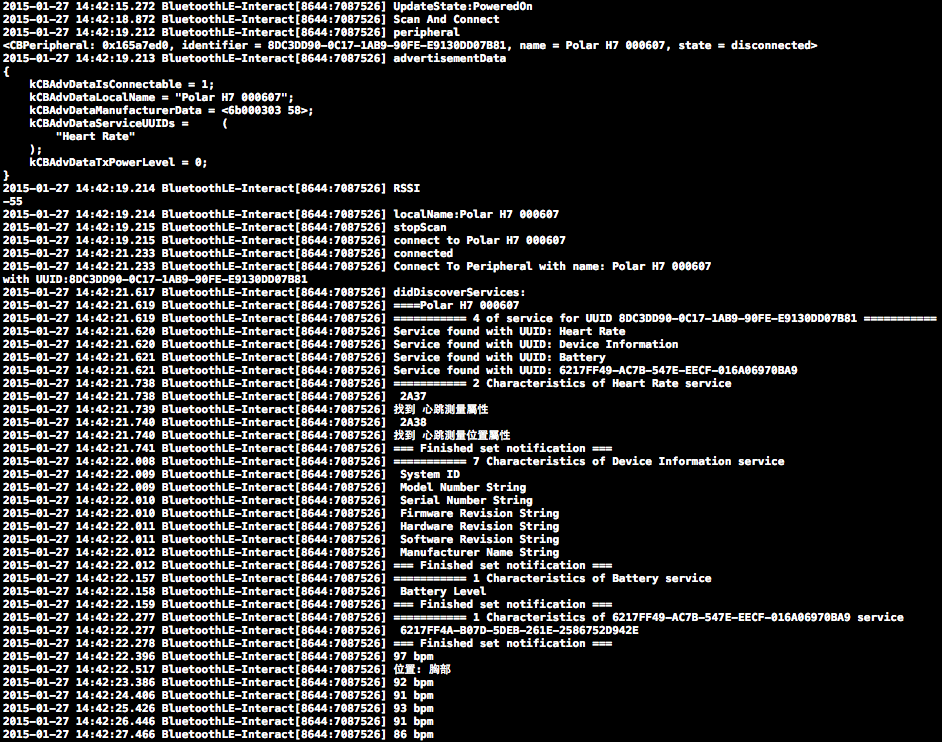
UI 增加顯示心跳資訊
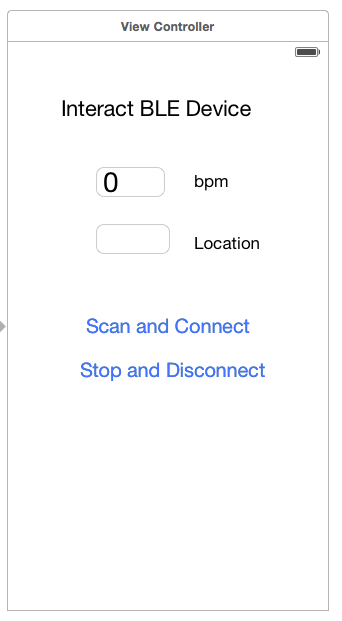
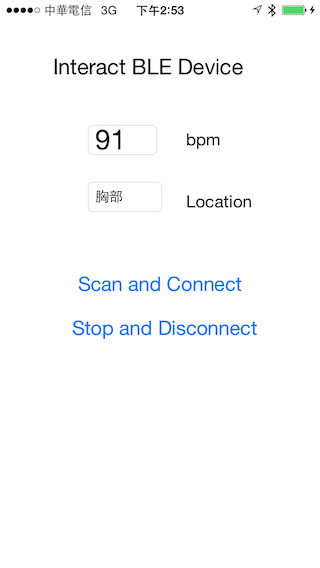
NSLog對於心跳測量資訊能正確顯示後,我們要將範例增加顯示資訊,這裡利用UITextField進行顯示,以下為Storyboard的配置:
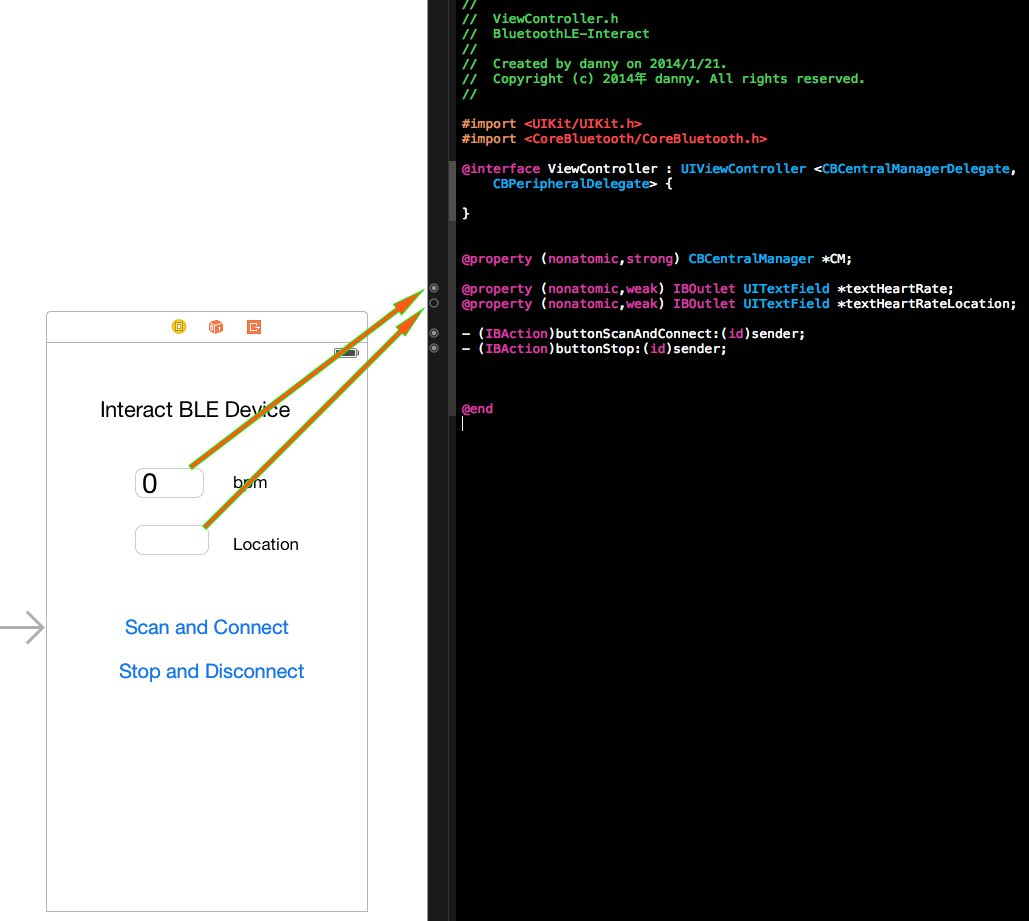
將UITextField進行綁定:
再將更新通知進行修改,更新資料時也將資料更新至UI,這邊資料更新UI處理程序綁定在轉換資料時進行更新UI:
- (void) conveterBPMData:(CBCharacteristic *)characteristic error:(NSError *)error
{
    // Get the Heart Rate Monitor BPM
    NSData *data = [characteristic value];      // 1
    const uint8_t *reportData = [data bytes];
    uint16_t bpm = 0;
    //判定第0個byte之第0個bit值為1的話要將取得的byte反轉 (LSB->MSB)
    if ((reportData[0] & 0x01) == 0) {          // 2
        // Retrieve the BPM value for the Heart Rate Monitor
        bpm = reportData[1];
    }
    else {
        bpm = CFSwapInt16LittleToHost(*(uint16_t *)(&reportData[1]));  // 3
    }
    // Display the heart rate value to the UI if no error occurred
    if( (characteristic.value)  || !error ) {   // 4
        NSLog(@"%@",[NSString stringWithFormat:@"%i bpm", bpm]);
        self.textHeartRate.text = [NSString stringWithFormat:@"%i", bpm];//更新UI資料
    }
    return;
}

- (void) conveterLocation:(CBCharacteristic *)characteristic
{
    NSData *sensorData = [characteristic value];//取得資料
    uint8_t *locationData = (uint8_t *)[sensorData bytes];//轉換成byte來取得特定的byte
    if (locationData ) {
        uint8_t sensorLocation = locationData[0];
        /*
         0 Other
         1 Chest 胸部
         2 Wrist
         3 Finger
         4 Hand
         5 Ear Lobe
         6 Foot
         7 ~ 255 Reserved for future use
         因Porla H7為胸部位置,所以針對取值後判斷是不是為1
         */
        NSLog(@"%@",[NSString stringWithFormat:@"位置: %@", sensorLocation == 1 ? @"胸部" : @"非位於胸部"]); // 3
        self.textHeartRateLocation.text = [NSString stringWithFormat:@"%@", sensorLocation == 1 ? @"胸部" : @"非位於胸部"];//更新UI資料
    }
    else {
        NSLog(@"%@",[NSString stringWithFormat:@"位置: 未知"]);
        self.textHeartRateLocation.text = [NSString stringWithFormat:@"未知"];//更新UI資料
    }
    return;
}
修改完成後,UI上面就多了心跳測量的資料更新:
總結
如果你是一路從(1)~(7)都看完,這些累績的結果希望能讓你了解到如何讀取BLE週邊(心跳表的資料)的過程,最後的範例程式為這系列範例程式最終的範例程式,如有其他意見或錯誤的地方留言給我。
你好,我算是您的忠實粉絲,哈哈^^ 裝置連線後取得屬性的UDID,更新通知、讀取後就能得到裝置回傳的資訊,您舉例的心跳,因為它是屬於連線後取得屬性的UDID就能自動接收到裝置的資訊,不知道我這樣說是否正確?如果我想做的是傳指令給裝置的話該怎麼實現呢?例如取得某個屬性的UDID後,利用這個屬性的UDID,當我寫入資料給裝置,裝置才回傳寫入資料後的狀態。 謝謝!!
Q:屬於連線後取得屬性的UDID就能自動接收到裝置的資訊
A:它是自動接收,利用通知的方式,所以設好就能收資料了
Q:如果我想做的是傳指令給裝置的話該怎麼實現呢?
A:你的裝置要提供寫入的屬性,這樣利用CoreBluetooth framework中的write (Service UUID + Characteristic UUID)
總之,你的設備必需要提供寫入、讀取的屬性這樣framework才能對它又讀、又寫
心跳裝置也有提供寫入的資訊,iOS可以裝LightBlue、OSX使用官方的”Bluetooth Explorer”與設備連線後就可能了解它的屬性!
請問一下
value = (null) -> 因為是寫入資料失敗嗎?或是寫入的資料格式錯誤呢? notifying = NO -> 這裡是指裝置回傳資料的部分嗎?因為寫入失敗所以這邊是顯示NO
謝謝^^
需要你提供此行印出的部分程式碼才能判斷喔!
-(void)peripheral:(CBPeripheral *)peripheral didDiscoverCharacteristicsForService:(CBService *)service error:(NSError *)error { for (CBCharacteristic *characteristic in service.characteristics) { if ((characteristic.properties & CBCharacteristicPropertyWrite) == CBCharacteristicPropertyWrite) { Byte byte[] ={0xFE,0x00,0x00,0x00,0x00,0x00,0xFD}; NSData *byteData = [[NSData alloc] initWithBytes:byte length:7]; CBCharacteristic *writeCharacteristic; [connectPeripheral writeValue:byteData forCharacteristic:writeCharacteristic type:CBCharacteristicWriteWithResponse]; } NSLog(@”characteristic: %@”,characteristic); 在這邊印出 } }
iOS寫入是沒提供訊息的,所以你有沒有寫成功還要看週邊不會回應你資料,比如:寫入11,週邊接收到11時,它就發通知回傳22這種的,或是要求你寫入後,立即讀取資料,你要查看你的週邊提供什麼樣的功能
好的,我繼續試試,非常感謝您。
丹尼大,請問如果跳轉到下一頁,要如何保持住連線?
還有從正在連線的頁面跳轉到下一頁之後,再回到原本連線的頁面,就不會work了,求解,謝謝
你要勾選BLE background的功能開啟讓BLE連線能在背景繼續運作試試看!
你好,請問連線之後,如何繼續取得RSSI呢? 謝謝^^
從你要連線的Peripheral物件執行methodRSSI就能取得,EX:peripheral.RSSI,但在iOS8後會建議使用
readRSSI後配合delegate – (void)peripheral:(CBPeripheral *)peripheral didReadRSSI:(NSNumber *)RSSI error:(NSError *)error ;取得!
謝謝^_^,ㄧ直取得RSSI 是使用time嗎?
使用NSTimer配合看看,iOS8將一些method變更,我還沒有深讀
要用計時的timer去固定執行ReadRSSI後去delegate取得值
您好,之前有問過您問題,對我幫助很大。 最近在寫要讀寫藍芽裝置的APP 同一個service下,一個characteristics是要寫值進去,另一個會把寫進去的值前面加上其他字串。 寫值 [peripheral writeValue:data forCharacteristic:writecharacteristic CBCharacteristicWrite]; 讀值直接用readcharacteristic.value
會發生問題,變成我這次寫完值 要讀的時候他會讀上一次write的值,而我這次write的值會在下一次寫新的值進去的時候才會讀到。 didUpdateValueForCharacteristic 想請問是否不能用這個方法readvalue
雖然有點不懂你的描述,不過你可以利用OS X的Bluetooth Explorer或是LightBlue For iOS看一下你要寫的characteristics的屬性是不是read/write,屬性很重要,這是BLE週邊提供的功能,有支援read/write才會因為你讀取時讀到正寫的,否則只有write時,你寫進去的值會存在它的buffer裡面,你讀到時也只是會讀到buffer,但系統不會因為你”讀取”而讓BLE週邊知道你是需要”讀”資料而進行內部處理將正確的資料給你”讀取”喔!
感謝您!已經用didupdatevalue讀取成功了! 另外想請教一下,有沒有可能從手機這邊下斷線的指令,而不是要藍牙裝置那邊沒訊號才斷線
didUpdateValue是屬於通知類型的讀取資料,與readCharacteristic是不同的,斷線要下[peripheral disconnect]就會斷線了
下[peripheral disconnect] 會出現 no visible @interface for”CBPeripheral” declares the selector “disconnect”
CBCentralManager *CM = [[CBCentralManager alloc] initWithDelegate:self queue:nil];
[CM cancelPeripheralConnection:peripheral];
//peripheral為你原本連線的Peripheral
您好,這系列文章真的幫助很大,目前遇到一個問題,我抓到一個擁有 read/write Property 的 Characteristic,想要使用它做對藍芽裝置的 io,因為是 write 不是 writeWithoutResponse,所以我用 peripheral.writeValue(data, forCharacteristic: self.ioChar, type: CBCharacteristicWriteType.WithResponse) 這個方法去寫資料,每次執行時 didWriteValueForCharacteristic,就會觸發事件,我把事件中的 characteristric.value 抓出來看卻不是我剛剛 write 進去的 data,永遠都是 [0, 24, 0, 24, 0, 0, 0, 72, 0]。然後在接收的部分 didUpdateValueForCharacteristic 也會收到一樣的 data,但是在藍芽裝置上卻沒有收到也沒有送出任何資料。不知道大大對這個問題有研究嗎?搞半天還沒搞定….
1.建議你先用LightBlue這類程式先進行手動的讀/寫看看是不是正常,基本上你對於週邊的read/write的動作對於藍芽模組是兩回事雖然對映的Characteristic位址暫存區是相同的),但要看看藍芽模組在處理你的read/write過程是直接將目前的值傳給你還是有其他的動作。 2.”WithResponse”這個動作是在於你寫入一個值時,藍牙週邊在同時間也會傳資料給你才會發didUpdateValueForCharacteristic,如果當下沒有回給你時會因為這樣didUpdateValueForCharacteristic收到的資料會是iOS提供的Buffer(也就是你寫入的值),你真的要讀藍牙周邊的值時需要下readValueForCharacteristic的指令才會讓藍牙週邊知道你是要讀取資料才會提供正確的資料引發didUpdateValueForCharacteristic時才會是週邊提供給你的資料
以上是我個人認為及說法提供你參考,有其他不正確的煩請指教,謝謝
謝謝大大回覆,問題解決了,這邊分享一下。 我這邊是公司去購買藍芽模組並接在自己研發的開發板上面,對於藍芽的廠商和硬體的部分我不是很了解,我是做軟體的部分,傳輸部分也不是照官方寫的那些 Characteristic 去傳輸,當然內容的 protocol 也不一樣,而我去問硬體組的工程師他好像也不清楚藍芽那塊模組的所有資訊,所以我只能做地毯式的錯誤測試…..。當我去 scan 藍芽模組的 service 時發現我這邊的模組有兩個 service,一個是 Device Info,這邊走的是藍芽官方網站的 Characteristic 值,全部都只有 Read 屬性。然後另一個 Server 沒有 name,只有 UUID,這個 Service 中有四個 Characteristic,也都沒有 name。 所以我將四個 Characteristic 的 Property 抓出來看分別是: 1. Read / Write 2. Write / Notify 3. Notify 4.Write / WriteWithoutResponse 經過一陣地毯式的測試,最後是以第 4 的 Characteristic 用 WriteWithoutResponse 去送資料,並且在第 3 個 Characteristic 的 Notify 收到回傳。
謝謝大大
恭禧你能自行解決問題,你的模組應該是一般常用的客制化的BLE to Serial模組吧!此類模組會用Write / WriteWithoutResponse與Notify來完成傳送與接收的,你一開始提供的訊息傳遞方式是較偏立即性的資料回覆,像範例中的心跳表會需要寫入資訊後再讀取得資訊再解析內容。
原來如此! 學習了! 謝謝大大!
大大不好意思我又來打擾您了,我遇到的問題是當我用 writeWithoutResonse 去寫大概 10 個 bytes 的 data 時收到的回傳時間大概間隔 1 秒左右,這還可以接受,可以當我傳送的資料量開始是一百多 bytes 的時候,回傳時間會非常大幅度的 delay,由其實如果我下了一個要藍芽回傳大概七八百 bytes 的資料時,甚至會 delay 到 5、6 秒。我這邊是每秒固定會傳 command 給藍芽裝置,我試圖用 writeWithResponse 去看我執行 write 到 didWrite 時的間隔,也是會越拖越長,所以感覺是 app 這邊 write 到真正 write 出去有 delay 到,可是不知道為什麼會有這 delay 時間,是 iOS 中藍芽的 write buffer 有效能上限嗎? 不好意思又來問大大~~~
據我個人的感覺,並非多項實驗結果,BLE資料傳輸並非最高優先權,iOS的確會有相當的Buffer將 BLE資料存入並且依照它自已的時間序將資料送出,有時訊號或環境有改變時速度會更慢,可以試試以20byte為主傳輸後延遲一下下再傳下個20byte或是傳輸大量資料時將BLE 週邊回傳的command先暫停讓它單工作業。
嗯嗯,了解,感謝大大~~
不好意思想請問一下,我這邊有發現假如連線後馬上斷線,再重新SCAN會發現裝置還處於連線狀態。 但假如連線後隔幾秒後再斷線就不會有這個問題。 是不是BLE在連線後會有一小段時間如果馬下斷線是不會馬上有動作的?
對,至少要1秒
正常斷線好像手機這邊會發0x13然後會收到裝置那邊的ack。 如果我連線完馬上下斷線的指令,從Sniffer那邊看到0x13大概四秒五秒後才會出現。 但如果連線完隔四秒或五秒後再下斷線,0x13就會馬上出現。 這時間會隨著不同裝置有所不同嗎?
是的,連線時會交換資料關於timeout的設定,會每隔一個時間去看看設備有沒有連線,沒有才會回報,
不好意思又有問題想請教了。現在開發的app,想要提高Write的速度。 如果我一直丟資料會造成中間的資料會loss,想請問有什麼API是可以讓我知道 什麼時候可以繼續丟下一筆資料到Buffer裡面或者繼續write
將資料最大為20bytes為一組將資料送出,iOS會自行調整將資料送出,如你未將資料以每20bytes一組寫入而是一次寫入超過20bytes的資料將會造成資料很大的loss。
大大有個問題想請教,在write資料時透過sniffer發現,有時候iphone這邊會拒絕device的connection interval要求。 device會重新要求connection interval。這時候就會導致write的時間變很慢。 ios這邊能跟android一樣去修改interval的值嗎?
iOS對於這些參數有要求,如果參數設定的值iOS不接受時就會直接斷線或是使用它自已預設值,你的interval值是多少?
一開始DEVICE要求的是差不多30ms不過iOS這邊拒絕。最後的interval值差不多為60ms。
您好!感謝您的文章分享讓我對iOS BLE有了基本的認知 。 另外有個問題想請教您: 如果要讀取藍牙裝置上的電池量(Battery Level)的變化,是否也是使用setNotifyValue呢? 因為我使用setNotifyValue,characteristic.value 是nil 反倒是使用readValue,就能讀取到資料, 可是這樣當電池量有變化,並不會以通知型得知current battery level,只會得到一開始連線時的電量而已。
通常電量不會是Notify,要用readValue,這要看你的設備當初Characteristics的定義是哪一種,不確定的話使用LightBlue,或是macOS上Xcode提供的Bluetooth Explorer看一下它的Characteristics屬性
好的! 謝謝您的回覆
您好,最近剛接觸app開發也有遇到相同的問題想請教!! 使用LightBlue連接裝置後,點選Battery Service進入Battery Level的頁面, 有個“read again”按鈕,不同時間按可以讀取電池的變化量
請問這種重新讀取Battery Level的value作法, 是否是重新連線,再重新讀取值呢? 照您的文章教學我把readValue寫在didUpdateValueFor characteristic方法裡面是可以讀取到電量, 但是,是否因為peripheral都沒變,所以用readValue都是相同的? 所以想請教您該怎麼像LightBlue一樣
您好,最近剛接觸app開發也有遇到相同的問題想請教!!
使用LightBlue連接裝置後,點選Battery Service進入Battery Level的頁面,
有個“read again”按鈕,不同時間按可以讀取電池的變化量
請問這種重新讀取Battery Level的value作法,
是否是重新連線,再重新讀取值呢?
照您的文章教學我把readValue寫在didUpdateValueFor characteristic方法裡面是可以讀取到電量,
但是,是否因為peripheral都沒變,所以用readValue都是相同的?
所以想請教您該怎麼像LightBlue一樣
與BLE所有的互動都應在連線狀態下操作就能讀取到正確的值